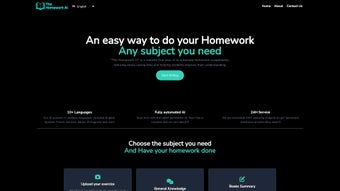

Download TheHomeworkAI – AI‑Powered Homework Assistance Tool for Students
Overview
TheHomeworkAI is a cloud‑native, AI‑driven study companion designed to simplify the everyday challenges that students face across high‑school and early‑college curricula. Powered by a state‑of‑the‑art large language model, the platform can generate precise answers, step‑by‑step solutions, concise summaries, and even fully‑cited essays in a matter of seconds. Whether you are wrestling with a calculus integral, need a quick literary analysis of Shakespeare’s *Macbeth*, or require a clear explanation of a historical event, TheHomeworkAI delivers a tailored response that aligns with the level of detail you specify.
Its multilingual engine supports more than ten major languages, making it a truly inclusive tool for learners around the globe. Security is baked into the architecture: all data transmissions are encrypted, and no personal information is stored beyond the active session, ensuring a safe environment for academic work. The service also offers a free tier with generous daily limits, allowing students to test the platform before deciding on a premium subscription that unlocks unlimited queries, priority support, and advanced citation styles.
By consolidating a wide range of academic utilities—math solver, essay generator, citation manager, and book‑summary module—into a single, responsive web portal, TheHomeworkAI aims to become the go‑to resource for anyone looking to reduce study stress, improve productivity, and deepen understanding across subjects.
Key Features and What Sets It Apart
- All‑Subject Coverage: Handles questions in mathematics, science, literature, history, art, and more.
- Multilingual Support: Works fluently in English, Spanish, French, German, Mandarin, Hindi, Arabic, Portuguese, Russian, Japanese, and Italian.
- Book Summaries & Literary Analysis: Generates chapter overviews, thematic breakdowns, character studies, and critical essays.
- Physics Solver: Provides step‑by‑step solutions for mechanics, electromagnetism, thermodynamics, and modern physics problems.
- Essay & Thesis Generator: Suggests outlines, thesis statements, and full drafts with citations in APA, MLA, or Chicago style.
- Instant 24/7 Availability: No waiting for office hours; the AI is always online.
- Secure Data Handling: End‑to‑end encryption and session‑only storage protect user privacy.
- Regular Updates: Weekly model improvements, new subject modules, and expanded language packs keep the tool current.
- Browser Extension: Chrome and Edge extensions add a quick‑access toolbar for on‑the‑fly assistance.
- Progressive Web App (PWA): Installable on mobile devices for an app‑like experience without a native download.
What truly differentiates TheHomeworkAI from competing solutions is the breadth of its academic toolbox combined with an intuitive, single‑page interface. Most AI‑based helpers focus on a single discipline—either math or writing—forcing users to juggle multiple subscriptions. TheHomeworkAI eliminates that friction by allowing a seamless switch between subjects, languages, and output formats without leaving the dashboard.
Its multilingual capability is especially valuable for ESL students, international classrooms, and bilingual families, as it removes language barriers that often impede comprehension. The inclusion of a dedicated book‑summary engine addresses a common pain point for literature majors who need reliable overviews for exam preparation. Moreover, the platform’s citation generator automatically formats references according to major academic styles, saving hours that would otherwise be spent on manual formatting.
These differentiators, coupled with a robust security model and a free tier that offers real‑world utility, make TheHomeworkAI a compelling choice for modern learners.
Installation, Setup, and Everyday Use
Getting Started – No Traditional Download Required
Because TheHomeworkAI is built as a cloud service, there is no need for a bulky installer or system‑level configuration. Users simply navigate to the official website, click “Sign Up,” and create a free account using an email address and a strong password. For added security, two‑factor authentication can be enabled via an authenticator app. After registration, the user is directed to a clean, responsive dashboard that adapts to desktop, tablet, or smartphone screens.
Step‑by‑Step Workflow for a Typical Query
- Select a Subject: Choose from a drop‑down list (e.g., Mathematics, History, Literature).
- Enter Your Prompt: Type the exact question, upload a PDF, or paste an image of a worksheet for OCR‑based text extraction.
- Choose Output Format: Options include short answer, detailed solution, essay draft, summary, or citation list.
- Set Language & Tone: Pick the desired language and specify whether you need a formal academic voice or a conversational style.
- Generate Response: Click “Solve” and watch the AI produce a response within seconds. You can refine the output by adding context or requesting an alternative perspective.
- Save or Export: Results can be saved to your personal library, downloaded as a PDF, or copied directly into a word processor.
Power users often install the optional Chrome or Edge extension, which adds a floating toolbar to any web page. This toolbar lets you highlight a passage, right‑click, and instantly request a summary or explanation without leaving the current site. The extension syncs with your account, preserving history and preferences across devices. Because all processing occurs on remote servers, the client side requires only a modern browser with JavaScript enabled; there are no heavy CPU or GPU demands, making the tool suitable for low‑spec laptops, Chromebooks, and mobile devices alike. This flexibility ensures that whether you are studying in a library, on a commuter train, or from a dorm room, TheHomeworkAI is always within reach.
Compatibility, Pros & Cons, and User Experience
TheHomeworkAI runs on any operating system that supports a current web browser, including Windows 10/11, macOS Monterey and later, major Linux distributions, Android 9+, and iOS 13+. The responsive design automatically optimizes layout for screens ranging from 13‑inch laptops to 6‑inch smartphones, guaranteeing a consistent experience regardless of device.
Pros
- All‑subject coverage eliminates the need for multiple specialized apps.
- Multilingual support broadens accessibility for non‑English speakers.
- Instant, 24/7 availability fits any study schedule.
- End‑to‑end encryption safeguards user data and privacy.
- Generous free tier provides real value before upgrading.
- Weekly AI model updates keep content accurate and relevant.
- Browser extension and PWA options enhance workflow efficiency.
- Built‑in citation generator saves time on reference formatting.
Cons
- Advanced mathematical proofs may require manual verification.
- Free version imposes a daily query limit that power users might exceed.
- No offline mode; a stable internet connection is mandatory.
- Citation accuracy depends on user‑provided source details.
- Premium subscription required for unlimited queries and priority support.
From a user‑experience standpoint, the platform feels polished and purposeful. The dashboard presents a minimalistic layout that reduces visual clutter, while contextual tooltips guide new users through each step. Load times are consistently under two seconds for most queries, thanks to efficient server‑side processing and CDN caching. Feedback mechanisms allow users to rate answers, helping the underlying model improve over time. Overall, the combination of broad compatibility, thoughtful design, and a transparent pricing model creates a smooth experience that resonates with students of varying technical proficiency.
Conclusion, Frequently Asked Questions & Call to Action
In summary, TheHomeworkAI delivers a comprehensive, AI‑enhanced academic toolkit that stands out for its subject breadth, multilingual capability, and secure, cloud‑based architecture. The free tier offers enough functionality for occasional use, while the premium plan unlocks unlimited queries, advanced citation styles, and priority assistance—making it a scalable solution for both casual learners and ambitious scholars. Minor drawbacks such as daily query limits on the free plan and the absence of an offline mode are outweighed by the platform’s speed, accuracy, and ease of access. For students seeking a single, reliable resource to generate answers, write essays, summarize texts, and manage citations, TheHomeworkAI is a worthy investment.
Ready to boost your academic performance? Create your free account today and experience AI‑driven homework help that works whenever you do.
Is TheHomeworkAI safe for academic integrity?
The platform is intended as a learning aid, not a plagiarism service. It provides explanations, outlines, and reference material that students should adapt and cite appropriately. Users are encouraged to review and personalize the output to comply with their institution’s policies.
Can I use TheHomeworkAI on my mobile device?
Yes. The responsive web interface works on Android and iOS browsers, and a progressive web app can be installed for an app‑like experience without going through an app store.
How accurate are the math solutions?
For most high‑school and early‑college problems, the step‑by‑step solutions are highly reliable. Complex proofs or graduate‑level topics may need manual verification, as the model occasionally simplifies nuanced reasoning.
What languages does TheHomeworkAI support?
English, Spanish, French, German, Mandarin Chinese, Hindi, Arabic, Portuguese, Russian, Japanese, and Italian are currently supported, with additional languages planned for future releases.
Is there a free version, and what are its limits?
The free tier allows up to 20 queries per day and provides access to basic features such as short answers, summaries, and standard citation styles. Unlimited queries, premium citation formats, and priority support are available with the paid plan.
TheHomeworkAI delivers a comprehensive suite of features that make it a top choice for students seeking AI‑assisted study help. Its strengths lie in subject breadth, language support, and ease of use, while minor limitations such as daily query caps on the free plan are offset by the generous premium options.



.png)



